
Print Shipping Labels.
Instantly.
No downloads. No ZPL confusion.
Print Shipi labels directly to your printer - on Mac & Windows.
Shipping labels shouldn’t require technical knowledge.
Carriers like FedEx often return labels in ZPL format.
But most merchants - especially on Mac - don't know how to open or print them.
Wasted Time
Converting files and troubleshooting printer settings takes hours.
Support Tickets
Constant emails from warehouse staff unable to print labels.
Delayed Shipments
Packages sit in the warehouse waiting for labels.
Frustrated Teams
Your team wants to ship, not fight with file formats.
Built for real-world shipping teams.
We abstracted away the complexity of file formats and printer drivers so you can focus on getting orders out the door.
How It Works
Simple, consistent, and fast.
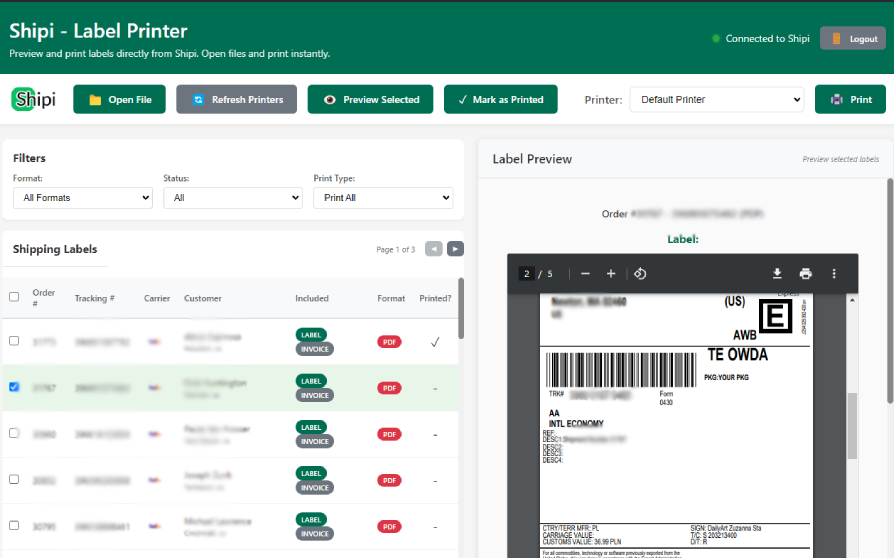
Open Shipi Label Printer
Launch the dedicated app on your desktop.
Select your order
Load labels instantly from your dashboard.
One click sends it to your thermal printer.
Trusted by
Why We Built This
A note from the founders
"One of our customers was asked by FedEx to print a ZPL label. She was on Mac - and had no idea what ZPL was."
"We realized this wasn't a carrier problem. It was a tooling problem."
"So we built a desktop app that removes this complexity entirely."
Enterprise Grade
One App. Two Ways to Use.
Whether you're just starting or scaling up, Shipi Printer works for you.
Manual Printing
For simple file handling
- Open & Print ZPL/PDF files
- Works with any thermal printer
Available for
Shipping teams don’t need more dashboards.
They need fewer steps.