
What is MCP?
MCP (Model Context Protocol) is an open standard created by Anthropic that lets AI assistants connect to external tools and services.
Think of it as a USB port for AI. Plug in Shipi, and your AI can ship packages, compare rates, and track shipments directly within your conversation.
Protocol Advantages
- Standardized AI-Tool communication
- Enhanced privacy & security
- Native support in Claude & Cursor
- Reduced latency for complex tasks
What Can You Do?
Harness the power of AI to automate your shipping logistics.
Create Shipping Labels
The AI creates the label, returns the tracking number, and gives you the PDF link.
Compare Carrier Rates
Instantly compare prices across FedEx, UPS, DHL, USPS, Aramex, and more.
Track Shipments
Get real-time tracking status and a link to your branded tracking page.
Manage Everything
18 tools covering your complete shipping workflow including pickups and address book.
18 Tools Available
Comprehensive set of tools for every shipping need.
| Category | Tools |
|---|---|
| Shipments | List shipments, Get shipment, Search shipments, Create shipment, Cancel shipment |
| Rates | Get shipping rates (multi-carrier comparison) |
| Tracking | Track shipment (auto-detect carrier) |
| Labels | Fetch labels (filter printed/unprinted) |
| Pickup | Schedule carrier pickup |
| Address Book | List, Get, Add, Edit, Delete addresses |
| Carriers | List carriers, Get carrier details |
| Account | Account info, Shipping statistics & analytics |
Supported Carriers
How to Connect
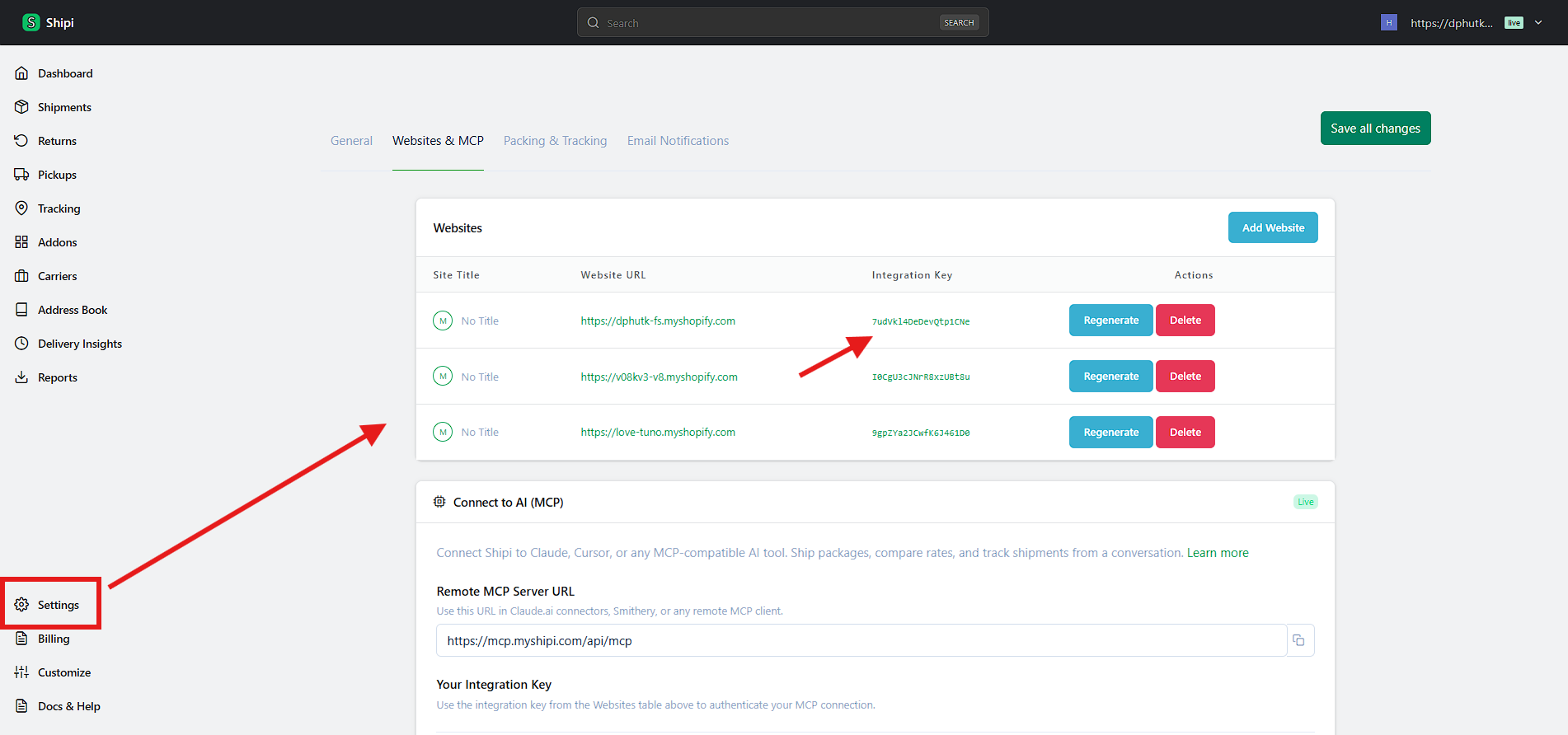
Remote (Recommended)
Works with Claude.ai, Smithery, and any MCP client that supports remote servers.
MCP Server URL
https://mcp.myshipi.com/api/mcp- 1.Go to your AI tool's MCP settings
- 2.Add a new server with the URL above
- 3.Enter your **Integration Key** when prompted
Local Install
Complete manual control for Claude Desktop or Cursor.
npm install -g shipi-mcp-serverClaude Config
{
  "mcpServers": {
    "shipi": {
      "command": "shipi-mcp-server",
      "env": {
        "SHIPI_KEY": "..."
      }
    }
  }
}mcp-remote
No installation needed. Uses your remote server via npx.
{
  "mcpServers": {
    "shipi": {
      "command": "npx",
      "args": ["-y", "mcp-remote",
        "https://mcp.myshipi.com/api/mcp"]
    }
  }
}
Great for quick testing without global installs.
Works With






Example Conversations
See how you can interact with Shipi through your AI assistant.
Compare Rates & Ship
I need to ship a 3lb package from Miami, FL 33101 to Toronto, Canada M5V 2T6. Compare rates across my carriers.
Here are your rates:
• FedEx International Priority: $45.20 (2-3 days)
• UPS Worldwide Express: $48.90 (1-2 days)
• DHL Express: $42.15 (2-4 days)

DHL is the cheapest. Would you like me to create the label?
Yes, ship with DHL.
Label created!
• Tracking: 1234567890
• Label PDF: [Download](https://app.myshipi.com/...)
• Estimated delivery: Feb 21, 2026
Check Stats
How are my shipments doing this month?
This month's stats:
• 247 total shipments
• 198 delivered (95% on-time)
• 31 in transit
• Top carrier: FedEx (142 shipments)
• Total shipping cost: $3,840.50
• Average cost per shipment: $15.55
FAQ
Is MCP free to use?
Yes, MCP access is included in all Shipi plans, including the free Lite plan.
Do I need to install anything?
No! You can use the remote URL https://mcp.myshipi.com/api/mcp directly. No installation required.
Is my data secure?
Yes. Your integration key authenticates every request. Carrier credentials (API keys, passwords) are never exposed through MCP. All communication is over HTTPS.
Which AI tools work with Shipi MCP?
Any tool that supports the Model Context Protocol: Claude (Desktop & Web), Cursor, Windsurf, VS Code with Copilot, and more.
Can I use this with my Shopify/WooCommerce/Wix store?
Yes! Shipi connects to your store. The MCP server gives your AI access to the same shipments, carriers, and addresses you see in the dashboard.